What do I mean by Shell?
By Shell, I mean your own terminal or the Python Shell which comes with Python itself when you install it.
The Shell is used to execute small code snippets instantly that sometimes confuse the developer and he/she wants to see how it works. Some people also use it as a quick calculator as Python is very good with numbers. I honestly don't know why someone will open Python Shell instead of a calculator but, it is what it is.
How can one execute Python in Shell?
Well, its very simple. Just open up your terminal and open Python there or if you are using the Python IDE itself, just open the Shell mode inside it. Below is the way to run it in your terminal, Python IDE users can drink a tea while reading it and if possible, buy me one too :)
If you are on a mac or a linux machine, execute this command inside the shell:
python3
Poor people, I mean windows users can run this command:
python
On some modern windows systems, this command opens up the microsoft store, if that's the case with you, run this instead:
py
OR
py -3
You'll now see something like this:

Well, that's your Python in action. Now, you can execute Python commands inside the Shell. In the next section we'll be executing some basic Python scripts and learning along the way. If you haven't read the last article in this series, please go through it once for the context.

Execution
Type in this:
print("Chai over coffee")
and press enter.
Congratulations, you are seeing an instant output right in your shell or an error if you misspelled print.
Now, lets look at how Python can work as a quick calculator meanwhile the calculator app is crying in the corner. Screw it anyway, type in 2 numbers, and an operator between them:
2 + 2
Press Enter
4
Yeah, I know its hard to calculate 2 + 2 on fingers, look, Python has solved your problem.
Okay, lets try some multiplication:
2 * 2
What does it give? Bingo! It's Four.
4
Well, if you don't know how mathematics works its your problem, why are you learning to code then? Pass your pre-school first.
What if I multiply a string? Let's try:
"chai" * 4
Enter:
'chaichaichaichai'
Exactly, Python concatenates the string 'chai' 4 times.
What if I store a variable?
score = 100
Enter:
Wait, why there is no output? Because we just stored 100 in a variable score, we never printed score.
score
Enter:
100
Okay, moving to some serious stuff now, I hope you've read the previous article and are oiled up for what's going to come
Serious Stuff
Importing the os module
In Python, we import a lot of modules. Some of them are pre-defined and some of them are defined by us.
Write in your terminal:
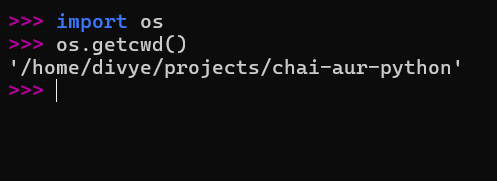
import os
os.getcwd()
os is a pre-defined module in Python and getcwd() is a method of it. It returns a string which contains the path of the current working directory (cwd):
Can we execute a loop inside it? Yes, why not!
Using a for loop
for c in "chai":
    print(c)
The output:
c
h
a
i
Remember in Python, after a colon (:), you have to give an indentation (typically 4 spaces [or a tab in your editor/terminal]). The indentation represents a block of code.
Importing the sys module
import sys
sys.platform
Press enter:
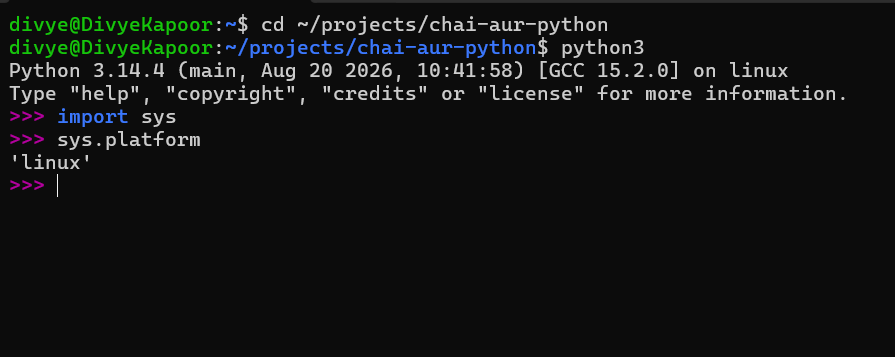
Why did I not put brackets? platform is a method of sys right?
Well, its a bit advanced concept, platform is a attribute of the object sys in Python. We won't go into much details right now in order to not overwhelm you, however, feel free to surf through the official docs for more details. You may find the official python docs at https://www.python.org/doc/
Well, now I hope that you've read the previous article, as we are going to refer to them right now:
Importing the hello_chai.py file from the previous article
For your ease and reference, the hello_chai.py file is given below:
print("Chai aur Python")

def chai_peelo(n):
    print(n)

# editing just a little
chai_peelo("lemon tea")
Now, we just import it inside the shell itself.
import hello_chai
Enter:
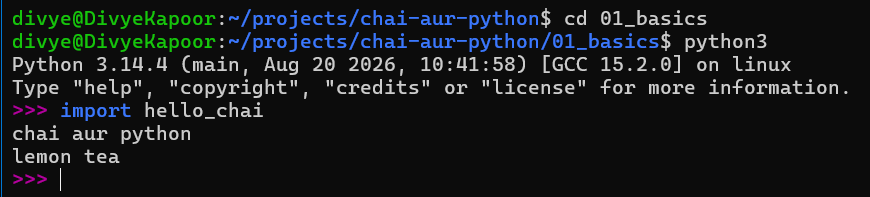
and it executes just by importing, no wonder haha.
Now, we had just seen above that we can access a method (a function) with a simple dot (.) operator, can we do it here as well?
Just a small personal advice, whenever you have a doubt related to code, whether a stupid one or an interesting one, try to actually write the code yourself and execute it for utmost clarity.
So, what should we do? EXECUTE!!!
hello_chai.chai_peelo("mint tea")
As it turns out, we can:
'mint tea'
Having some fun with our code
Editing hello_chai.py further
print("Chai aur Python")

def chai_peelo(n):
    print(n)

chai_peelo("lemon tea")

# Editing further
chai_one = "lemon tea"
chai_two = "ginger tea"
chai_three = "masala chai"
These variables are also called attribute if you are familiar with OOP.
Wait, we were accessing properties with the dot (.) operator as well, can we? The simple answer to this would be a YES, but there is a catch.
We just imported the file hello_chai in our shell, those Fixed Binaries already came in due to the import statement and they were never changed as we never refreshed our imports but, made a change in the source file i.e., hello_chai.py so how will the changes reflect here as well?

To solve this problem, we have to use another pre-defined Python library (or module) named importlib. We need just one method of this library, reload.
import hello_chai
from importlib import reload
reload(hello_chai)
Press enter, and don't be afraid of the output, its just telling you what all has been reloaded. Just write code further:
hello_chai.chai_one
hello_chai.chai_two
hello_chai.chai_three
What do we have here?
'lemon tea'
'ginger tea'
'masala chai'
Thanking You
I hope you liked the article, the foundational concepts for Python are over, we'll now dive deep in mutables and immutables in the next part.
A big thanks to Hitesh Choudhary Sir for this series, I am just passing on the baton further <3.
Written by Divye Kapoor with ❤️
Comments
Join the discussionNo comments yet. Be the first to comment.
Chai aur Python
This series contains everything I learnt while watching Chai aur Python by Hitesh Sir on YouTube